A low cost option for creating your own “Web Business Card”
Jet Age Museum – May 2015
02/05/2015
Leave a comment
To see Vulcan B.2 XM569, all painted and looking resplendent.
 |
 |
|
| Waze and the drizzle. | Checking my mirror before pulling away. | |
 |
 |
|
| Tesco Full English for energy. | And Costa for coffee. | |
 |
 |
|
| Excellent paint job. | The reflection isn’t bad either. | |
 |
 |
|
| Firestreak. | ||
 |
 |
|
| Gloster Javelin FAW9 XH903 | ||
 |
 |
|
 |
 |
|
Categories: Aerospace, Military, Travel
#mb03, Gloucester, Javelin, Jet Age Museum, May 2015, Vulcan
Music This Month – April 2015
30/04/2015
Leave a comment
Anastasia – Slash
Rock Me – Great White
Take it on the run – REO Speedwagon
Bad Moon Rising – Creedance Clearwater Revival
Blue and Evil – Joe Bonamassa
Sultans of Swing – Dire Straits
Categories: Music, That Was...
April 2015, Music, review, That was
April 2015
30/04/2015
Leave a comment
The month of:-
minilock.io
Flake Egg
Bog Myrtle
Ruler
Thunderbird (not that one)
Swap out
Red Onions in
17°
All Onions now in
Markdown Pad
All Earlies now in
iOS 8.3
Maincrop in
Spring Vulcan
Weed and feed lawn
From gas to liquid
Love the link
Burning
Voted
Team Ponty
Missing bus
4 and Three!
Superteam and rain
Dropping the bomb
Coming in May 2015
Tanks
Categories: That Was...
April 2015, review, That was
How To Create A Personal Landing Page With About.me
30/04/2015
Leave a comment
Categories: Work
About.me, April 2015, Internet, Personal Branding, Personal Landing Page
Team and Bus
29/04/2015
Leave a comment
Team Ponty
No Bus Newport
Categories: Food and drink, Spoons Tour
Ale, April 2015, Beer, Bier, Caerphilly, John Wallace Linton, Malcolm Uphill, Newport, Pen and Wig, Pontypridd, South Wales, The Lamb, The Tumble Inn, Wetherspoons
How To Setup A Blogger Blog
28/04/2015
Leave a comment
Whether it’s just somewhere to host your CV or to showcase your talents. A blog maybe just the thing. This is Blogger, a free Blog. Other free Blogging platforms are available.
How to – Google Alerts
22/04/2015
Leave a comment
How to use Google to search for jobs even when you can’t.
Categories: Work
Old and New
19/04/2015
Leave a comment
None too cheap
But with a money off app
Categories: Food and drink, Spoons Tour
Ale, April 2015, Beer, Bier, Cardiff, Ernest Willows, Old Market Tavern, South Wales, Wetherspoons
No Lamb
19/04/2015
Leave a comment
It’s a Sunday
And it’s closed
Categories: Food and drink, Spoons Tour
Ale, April 2015, Beer, Bier, John Wallace Linton, Newport, Pen and Wig, South Wales, Wetherspoons
How To Use RSS To Delivery Jobs To You
15/04/2015
Leave a comment
Cardiff City Council
Jobs via rss

The Ramblers
Jobs via rss
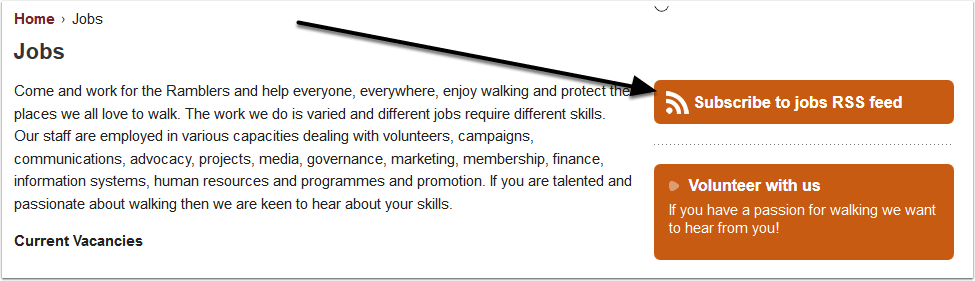
Recruitment International
Jobs via rss

Radio Today Jobs
Jobs via rss

And The Big One – Google Alerts
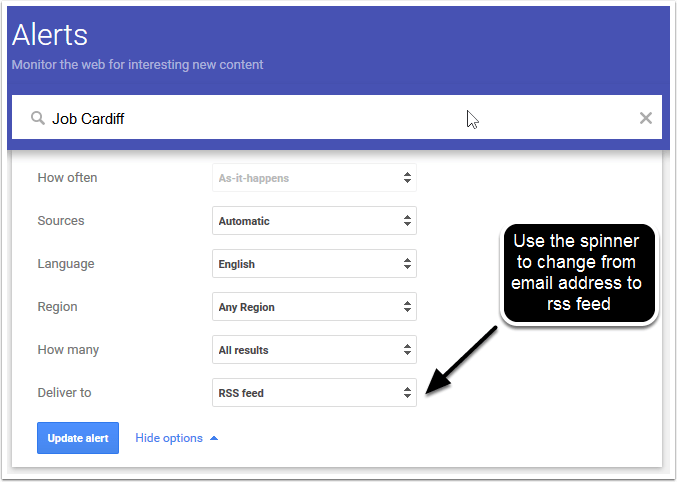
Setup Google Alerts and they can be delivered by rss. The screen below is accessed by clicking on the pencil (edit) symbol, next to each Alert search term. When you click on "Update Alert" an rss icon will appear next to the pencil icon. This can be used to enter into your feed reader (see later).
Now How To View These Jobs
What you need is something called a News Aggregator or Feed Reader. There are many to choose from and it is probably best to choose a web based one as that will work with whatever computer / tablet / smartphone you. I am going to use Feedly a free web based Feed Reader.
How To Create a Feedly Account
The Feedly welcome page

Select Login First
We are going to ignore Explore and Import OPML and click on the login button, top right. You can login with your Google, Facebook, Twitter, Microsoft or Evernote credentials. It says welcome back even if you haven’t logged in before. I’m going to login with Twitter.
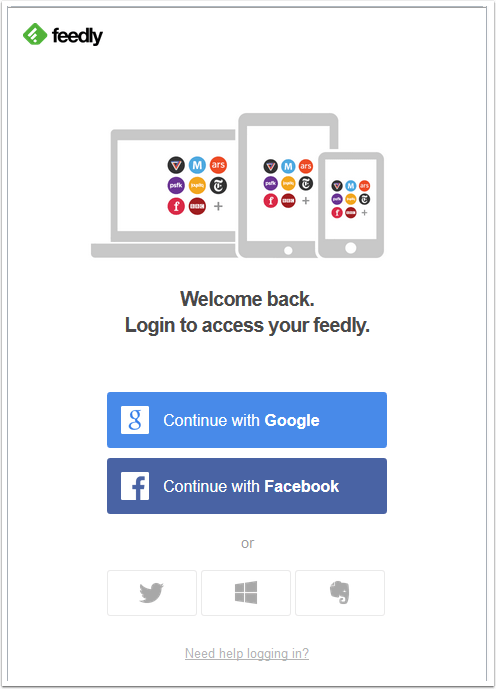
Login With Twitter
This is just a personal preference. Enter your username, password, tick "remember me" and click "sign in".

And We Are In
Next Step, adding a feed.

Add A Feed
Here I’m adding the rss feed from Cariff City Council. The Browser I am using is Firefox. I right click the rss icon (orange and white square) and left click on "Copy Link Location".

Paste Here
Right click and select paste
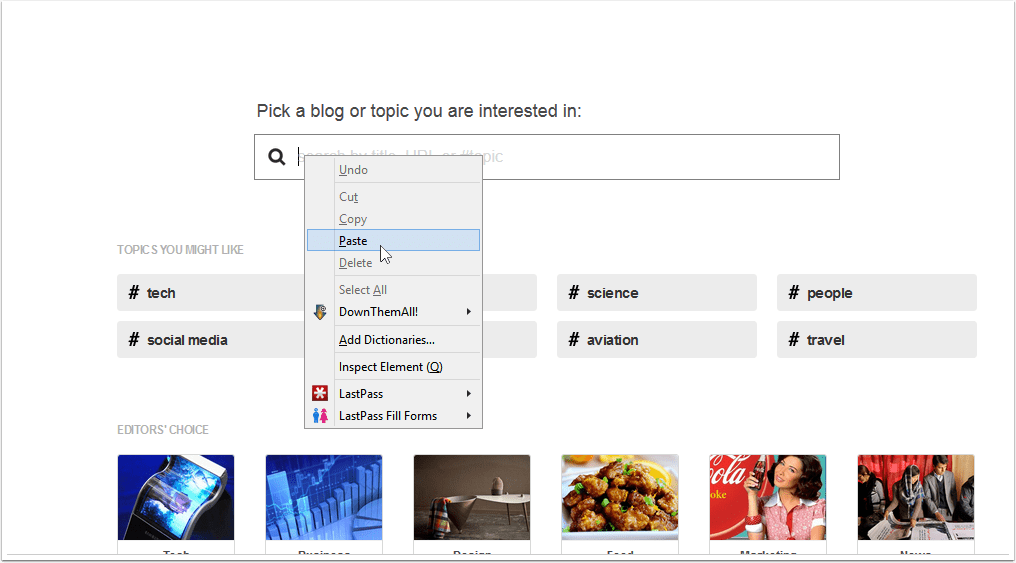
Enter The Feed Into Feedly
The pasted feed and "sites" drops down below.

Select The Feed
Left click here.

And This Is What You Get
The current vacancies.

Left Click On The +Feedly
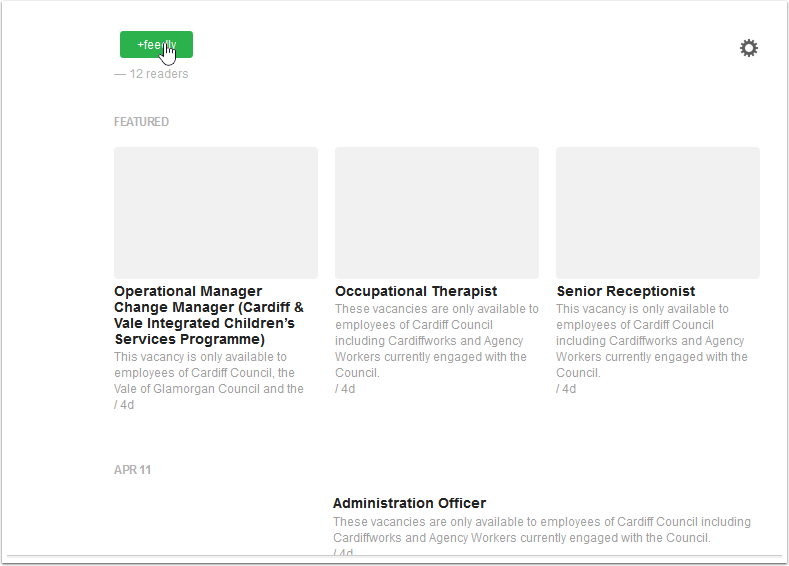
Add A Title
I gave the feed a name "Cardiff Council Jobs". "Must Read" means that Feedly will give those feeds so marked greater prominence. "Collections" are basically folders into which you can put feeds. At the bottom left, click on the green "Add" button.

Click The Add Button
And there you go

Now To Add Some More
And there we go. The feeds will update automatically. Using IFTTT you can even connect your Feedly account

Categories: Computers and Internet
 The R W Nash Blog